

View EXIF data instantly,
from any image
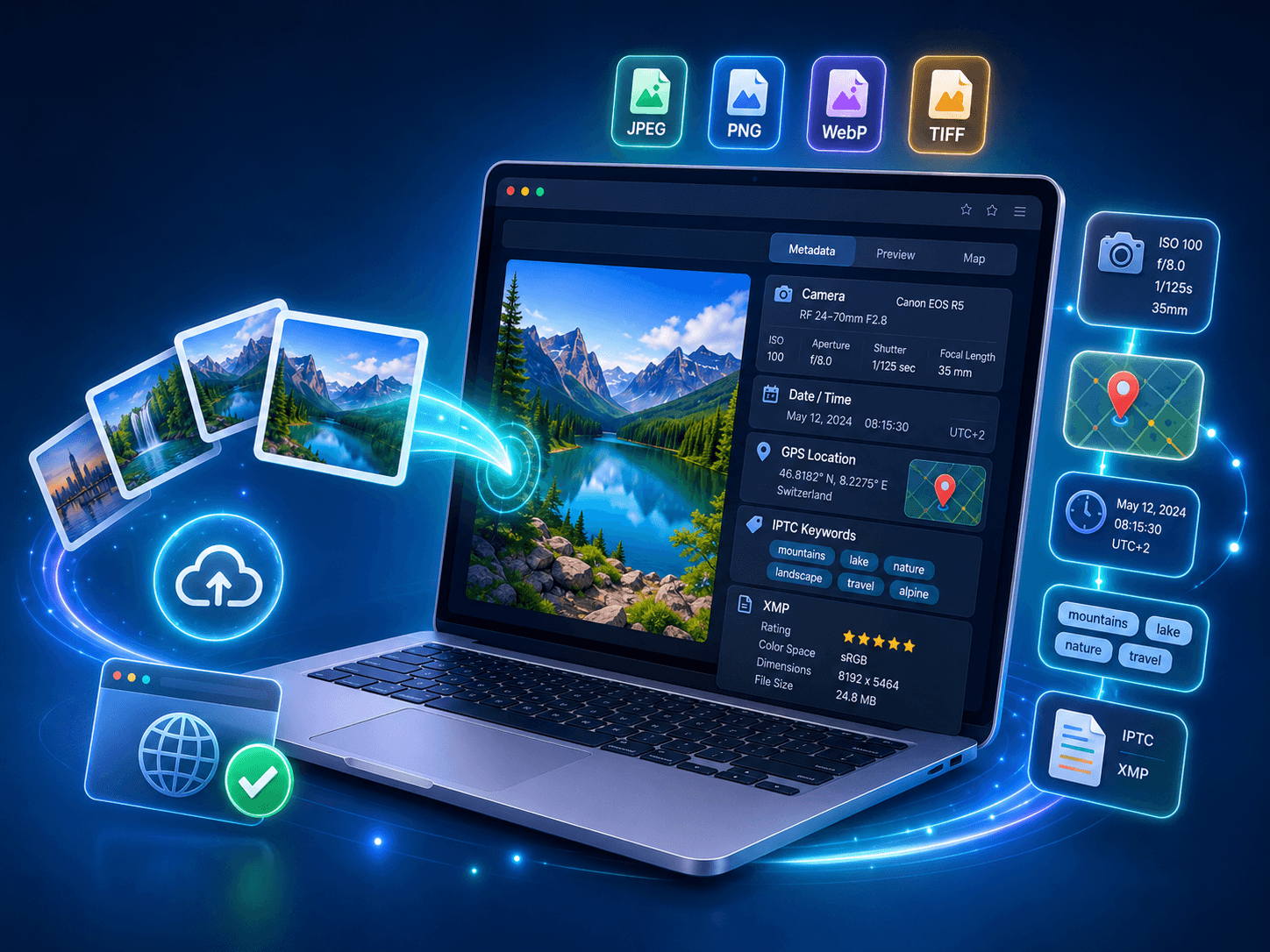
Upload a photo and see every piece of hidden metadata — camera settings, GPS location, timestamps, IPTC keywords, and XMP fields. No software to install. Works on JPEG, PNG, WebP, and TIFF.
Works with JPEG, PNG, WebP, TIFF, and RAW files. No upload limits. Your files stay private.
Read the data hidden inside every photo
An EXIF viewer is a tool that reads and displays the metadata embedded inside image files. Every photo taken with a digital camera or smartphone contains hidden data — from the camera model and lens used, to the exact GPS coordinates where the shot was taken.
Our online EXIF data viewer extracts all metadata standards in one place: EXIF fields (camera and capture data), IPTC fields (editorial keywords and captions), and XMP fields (creator rights and custom tags). Whether you need to check a photo's origin, verify timestamps, or audit metadata before publishing, this tool does it in seconds.

What data can you view
Every image carries more data than you think. Here is what our EXIF data reader extracts from your files.
Camera & Capture Data
Camera make and model, lens info, focal length, aperture, shutter speed, ISO, flash status, white balance, and metering mode. Everything your camera recorded at the moment of capture.
GPS & Location
Latitude and longitude coordinates, altitude, and direction. See exactly where a photo was taken on a map. Critical for privacy checks before publishing images online.
Date & Time
Original capture date, digitized date, and last modification date. Three timestamps that tell the complete story of when an image was created and edited.
IPTC Keywords & Captions
Editorial keywords, title, description, category, and credit line. The metadata standard used by news agencies, stock platforms, and professional photographers worldwide.
Copyright & Creator
Author name, copyright notice, usage terms, and creator contact. Protect your intellectual property and verify image ownership with embedded rights metadata.
Software & Processing
Editing software name and version, color space, bit depth, compression type, and orientation. See what tools were used to process an image after capture.
View EXIF data online in 3 steps
Step 1 — Upload your image. Drag and drop any JPEG, PNG, WebP, or TIFF file into the viewer. Your image is processed locally — nothing is stored on our servers.
Step 2 — Read the metadata. Every embedded field is displayed in a clean, organized layout. Camera data, GPS, timestamps, IPTC, and XMP are separated into clear sections so you find what you need instantly.
Step 3 — Export or take action. Copy specific fields, export the full metadata report as JSON or CSV, or jump straight to our editor to modify what you see. If sensitive data like GPS is present, use our remover to strip it before sharing.
How to view EXIF data on web, phone, and desktop
If you want to check EXIF data quickly, the fastest option is an online EXIF viewer. A good EXIF data viewer should extract camera info, GPS coordinates, and all metadata fields in one screen. This is the fastest way to view EXIF data online without installing an app.
For desktop users, you can still use native tools, but a dedicated EXIF data reader online is usually cleaner. On Windows, most people want to strip or view EXIF data without opening file properties. On macOS, EXIF tools for Mac and native preview options are common for deeper analysis.
Mobile users often search for EXIF metadata app for iPhone or how to see EXIF data on Android. If you need complete tags instead of a basic summary, an image EXIF viewer or online EXIF reader gives you a more complete output — every field, every standard, in one place.

Fields you will find in most images
These fields are automatically recorded by cameras and smartphones. Our viewer reads all of them.
| Field | Example Value | Standard |
|---|---|---|
| Camera Make | Canon | EXIF |
| Camera Model | EOS R5 | EXIF |
| Lens | RF 24-70mm f/2.8L | EXIF |
| Focal Length | 50mm | EXIF |
| Aperture | f/2.8 | EXIF |
| Shutter Speed | 1/250s | EXIF |
| ISO | 400 | EXIF |
| GPS Latitude | 48.8566° N | EXIF |
| GPS Longitude | 2.3522° E | EXIF |
| Date Taken | 2026-03-15 14:32:08 | EXIF |
| Keywords | landscape, mountain, sunset | IPTC |
| Title | Alpine Sunset Over Lake Geneva | XMP |
| Copyright | 2026 John Smith | IPTC / XMP |
| Software | Adobe Lightroom 8.2 | EXIF |
Why EXIF data feels invisible but is still searchable
Most people only see the image, not the metadata payload inside it. A standard EXIF data viewer, EXIF reader online, or metadata viewer can still extract location, device, and timestamp fields in seconds.
GPS coordinates can reveal your home or office
Photos taken at home carry your exact address in GPS metadata. Anyone with an EXIF viewer can extract it.
Device info can identify you
Camera serial numbers, phone model, and software version create a unique digital fingerprint across your photos.
Timestamps reveal your patterns
Dates and times across multiple images can map your schedule, travel history, and daily routines.
Metadata survives across platforms
Not every platform strips EXIF data on upload. Files shared via email, cloud storage, or direct download keep everything intact.
Frequently asked questions
Quick answers about EXIF viewers, image metadata, and privacy.
Check your images, then optimize at scale
Start with a free EXIF data viewer scan, remove sensitive metadata, then use AI-assisted editing to auto-populate EXIF, IPTC, and XMP across your image library.